| Tel. Chester 01244 342090 |  |
| home | services | web design | web portfolio | cad design | contact |
|
Remote Help & Support
Requirements
1.
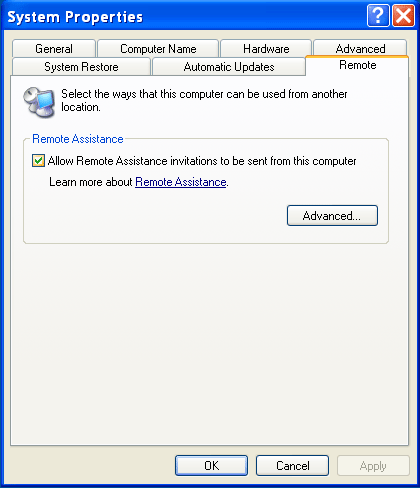
Open the System Properties Dialog box which can be opened
from the control panel.
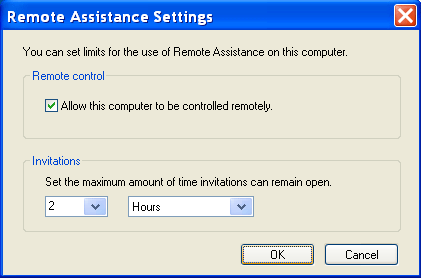
2.
Click Advanced and make sure 'Allow this computer to be controlled
remotely' is ticked.
Create The Invitation.
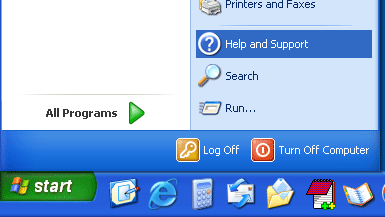
2. Click 'Start > Help and Support'
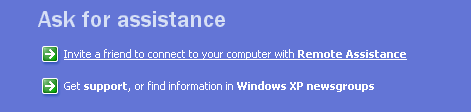
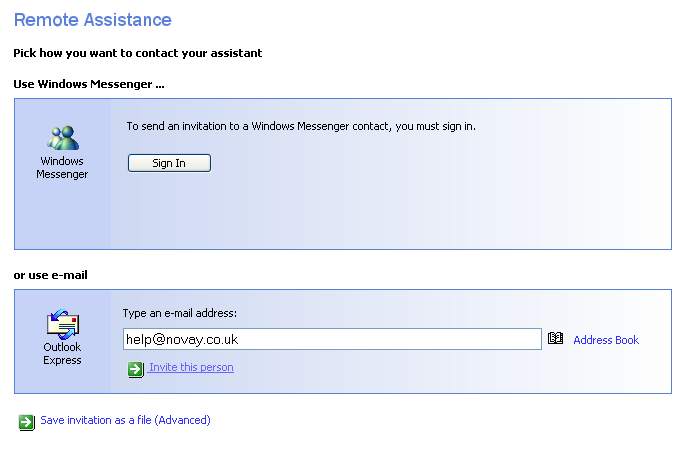
3. Click 'Invite a friend to connect to your computer with Remote Assistance'
4. Click 'Invite someone to help you'
5. Contact us by using email not Windows Messenger. Type in help@novay.co.uk
6. Provide contact name and description of problem
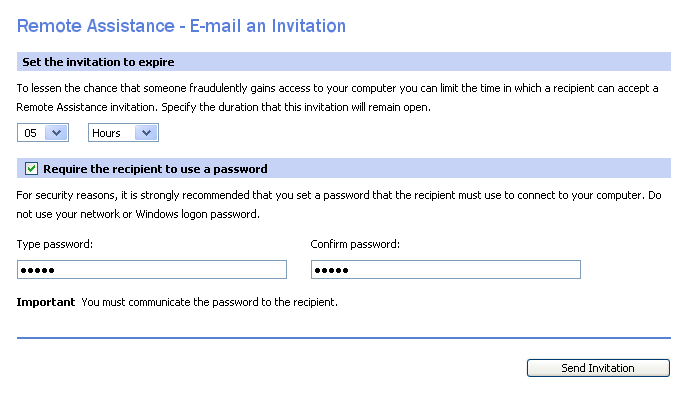
7. Set invitation to expire after 5 hours. Set a password which you will have to tell us.
8.
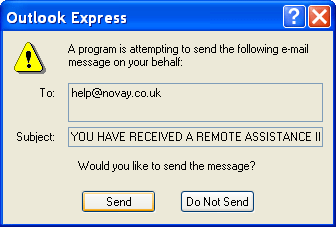
The invite is now sent to your email program (e.g. outlook
express). Click Send That's it, now we can help you fix the problem !
Other
|


| home | services | web design | web portfolio | cad design | contact |
Tel. 01244 342090 |
 |